
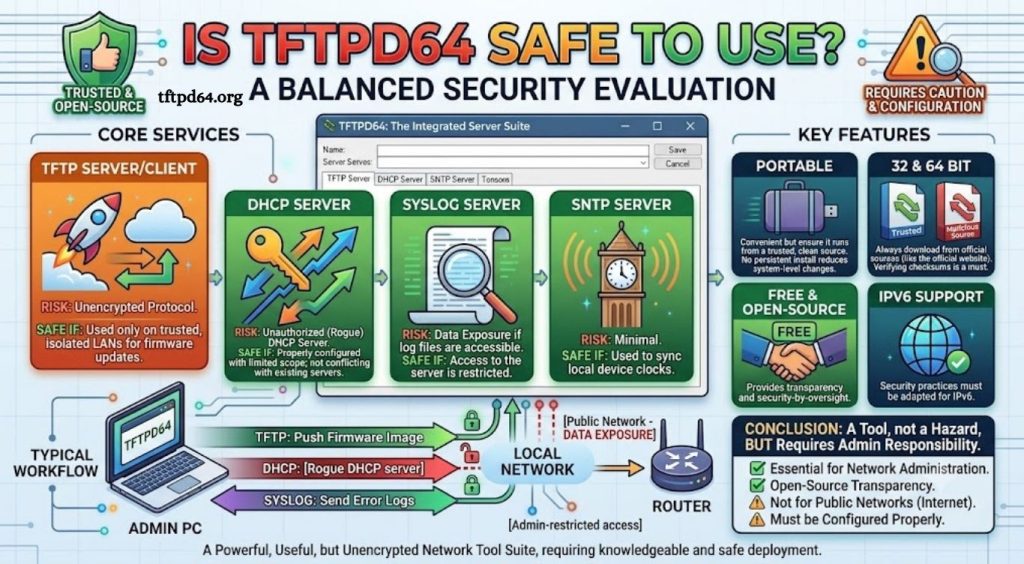
TFTPD64 is a popular lightweight networking tool designed for transferring files, managing TFTP services, and supporting network configuration tasks. Many IT professionals, network administrators, and developers use it for tasks such as firmware updates, device configuration, and troubleshooting network equipment. However, because TFTPD64 works with network services, many users often ask, “Is TFTPD64 safe to use?”
The safety of TFTPD64 depends on how it is installed, configured, and used. Like any network utility, it can create security risks if exposed incorrectly or used without proper settings. Understanding its features, security limitations, and recommended usage practices can help users decide whether TFTPD64 is a reliable tool for their networking needs.
What Is TFTPD64?
TFTPD64 is a Windows-based network utility developed by Philippe Jounin. It combines several networking services into one application, including TFTP, DHCP, DNS, SNTP, and Syslog functions. The software is commonly used by network engineers for testing, managing devices, and transferring files between computers and network hardware.
Read More: What is TFTPD64?
The TFTP protocol used by TFTPD64 allows file transfers between devices without requiring authentication. This makes it fast and simple but also means security depends heavily on the network environment and configuration. TFTPD64 is mainly intended for controlled environments such as local networks rather than public internet connections.
Is TFTPD64 Safe to Install?
TFTPD64 is generally considered safe to install when downloaded from a trusted source. The official version does not contain known malware or harmful components. However, downloading the application from unofficial websites can increase the risk of receiving modified files containing unwanted software.
Before installing TFTPD64, users should verify that the installer comes from a reliable source and scan the file with updated security software. Keeping Windows security features active can provide additional protection against potentially unsafe files.
Does TFTPD64 Have Security Risks?
Although TFTPD64 itself is not considered dangerous, the services it provides can introduce security concerns if they are configured incorrectly. The biggest concern comes from the TFTP protocol because it does not include encryption or user authentication.
If TFTPD64 is running on an open network, unauthorized users may attempt to access transferred files or interact with network services. This risk is higher when the software is used outside a protected local environment.
Another possible concern is leaving unnecessary services enabled. TFTPD64 includes multiple networking features, and running services that are not needed may increase the number of possible entry points on a system.
Is TFTPD64 Safe for Home Users?
For home users, TFTPD64 is usually safe when used for specific tasks and closed after use. It is often unnecessary to keep the application running continuously unless there is an ongoing networking requirement.
Home networks with proper router security and firewall protection provide a safer environment for using TFTPD64. Users should avoid allowing access from unknown devices and should make sure the software is not exposed directly to the internet.
Is TFTPD64 Safe for Business Networks?
TFTPD64 can be useful in professional environments, especially for network maintenance and device management. Many organizations use similar TFTP tools for updating routers, switches, and other network equipment.
However, businesses should apply security controls before using TFTPD64. Network administrators should limit access to trusted devices, use firewall restrictions, monitor activity, and avoid transferring sensitive information through unsecured TFTP connections.
Because TFTP does not encrypt data, organizations should consider alternative secure transfer methods when handling confidential files.
How to Use TFTPD64 More Securely
Using TFTPD64 safely requires proper configuration and responsible network management. Restricting access to local networks, limiting file directories, and disabling unused services can significantly reduce security risks.
Users should also avoid storing sensitive files in the TFTP directory because anyone with access to the service may potentially retrieve them. Regularly updating the software and monitoring network activity can further improve security.
A firewall can provide an additional layer of protection by controlling which devices are allowed to communicate with TFTPD64. This prevents unauthorized connections and reduces exposure.
Does Antivirus Detect TFTPD64 as a Threat?
Some antivirus programs may occasionally display warnings about network utilities like TFTPD64. These alerts do not always mean the software is malicious. Security tools sometimes flag applications that open network ports because similar behavior can also appear in harmful programs.
If TFTPD64 was downloaded from a trusted source and the file is verified, an antivirus warning may be a false positive. Users should review the detection details before making any decision.
TFTPD64 vs Secure File Transfer Alternatives
TFTPD64 is designed for simplicity and speed rather than advanced security. For environments requiring encrypted communication, secure alternatives such as SFTP or SCP are often better choices.
TFTPD64 remains valuable for network equipment configuration, testing, and internal operations where security risks are controlled. The right choice depends on the purpose of the file transfer and the sensitivity of the information being handled.
Conclusion
TFTPD64 is safe to use when downloaded from a reliable source and configured correctly. The software itself is not harmful, but its networking features require careful management because TFTP lacks encryption and authentication. For home users, developers, and network professionals working in controlled environments, TFTPD64 can be a useful and reliable tool.